
Basketball Legends Unblocked — Play Free Online
More Sports and Party games


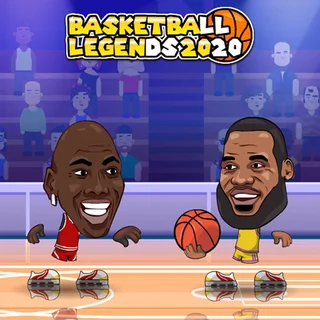






Basketball Legends unblocked: play Basketball Legends online free right here in your browser — no download, no sign-up, works on a school Chromebook.
Basketball Legends brings over-the-top streetball action directly to your browser with exaggerated bobblehead superstars, thunderous slam dunks, and lightning-fast full-court battles. Whether you enter the tournament bracket solo or share a keyboard with a friend for head-to-head competition, every possession delivers quick momentum swings and high-flying theatrics.
Matches are split into fast-paced timed halves where court positioning and split-second timing determine the winner. You can run one-on-one duels or pair up for chaotic two-on-two games, passing to AI teammates, picking off errant passes, and soaring from the three-point line for backboard-shattering dunks. For players on Drift Boss who love intense arcade reflexes and responsive controls, hitting the court provides an ideal change of pace between drift runs.
How to play
Control schemes are straightforward, allowing solo players and local pairs to compete seamlessly on a single keyboard:
- Movement: Use WASD (Player 1) or the Arrow Keys (Player 2) to run across the court. Double-tap left or right to dash past defenders.
- Shooting and Dunking: Press B (Player 1) or L (Player 2). Tap and hold to charge standard jumpers, or run toward the rim and jump to finish with an acrobatic slam.
- Stealing and Blocking: Tap Down Arrow or S on defense to swipe at the ball, or time your leap to swat incoming shots out of mid-air.
- Super Shot: Once your special meter fills completely, press V (Player 1) or K (Player 2) to launch an unstoppable signature super shot that blazes directly through the net.
Winning tips and court strategy
- Save supers for clutch moments: Because super shots are guaranteed points that opponents cannot block, holding your charge for the final seconds of a half can secure victory or force overtime.
- Dash into dunks: Initiating a double-tap dash right before launching toward the basket gives your player extra lift and forward velocity, making your dunk much harder for defenders to swat away.
- Time your steals carefully: Wildly spamming the steal command leaves your player momentarily rooted to the floor. Wait until your opponent plants their feet or begins gathering for a shot before lunging in.
- Do not jump early on defense: Opponents often use pump fakes to draw you into the air. Keep your ground and only leap for the block when you see their player physically leave the hardwood.
Similar games on Drift Boss
If you enjoy the fast reflexes and competitive rhythm of Basketball Legends, try other instant-play favorites on Drift Boss. Sharpen your precision timing in Drift Boss and Blaze Drifter, explore high-octane courses in Burnout Drift: Hilltop, or navigate tricky obstacle courses in Moto X3M 4: Winter.
Questions about Basketball Legends
Is Basketball Legends unblocked at school?
Basketball Legends runs in an ordinary browser tab from driftboss.me, with nothing to download or install, so it plays on most school Chromebooks and work computers. If a network filter blocks the site, only that network's administrator can change it.
Can two people play Basketball Legends on the same keyboard?
Yes, Basketball Legends includes a local two-player mode where Player 1 uses WASD and action keys while Player 2 uses the arrow keys and action keys.
How do you trigger a super shot in Basketball Legends?
Fill your special energy meter by scoring baskets and defending, then press the super shot key (V for Player 1 or K for Player 2) to execute a guaranteed scoring move.
Which game modes are available in Basketball Legends?
You can compete in tournament brackets to win the championship trophy, play random quick matches against AI, or practice shot timing in training mode.
Does Basketball Legends require an installation or account?
No, Basketball Legends runs entirely in modern web browsers on desktop and laptop computers without downloading files or creating accounts.
More games
 Super Tunnel Rush
 Mad Truck Challenge Special
 Sky Mad
 Mad Cars Racing And Crash
 Truck Traffic
 Stickman Climb 2
 Super Falling Fred
 Soccer Skills 2 World Cup
 Johnny Trigger Action Shooter
 Blaze Drifter
 Burnout Drift: Hilltop
 Burnout Extreme Drift 2
 Driftwave
 Shift to Drift
 3D Car Simulator
 Crazy Road Trip
 Hill Climb Racing Lite
 Moto X3M 4: Winter
 Moto X3M 5: Pool Party
 Turn Right
 Mad Skills Rallycross
 Blacktop Police Chase
 Rally Point 5
 Need for Madness
 Highway Traffic
 Stunt Simulator Multiplayer
 Minicars Soccer